
Playrooms Gameplay: One Shift, Step by Step (2026)
How a Playrooms shift works, from the office desktop to lights out: the ball-to-money loop, the skills panel and where the first 100 euros go.
Quick answer: A Playrooms shift is a cleaning job with a payroll attached. You pick balls off the floor, dump them in a pit, and the pit pays you. Money buys keys to new rooms, carrying capacity and tools. The shift has a fixed length, and when the lights start going out you walk back to the office. Everything else in the game, including the horror, hangs off that one loop.
The official store description puts it in three lines: collect the balls, bring them back, fill the ball pits. Full pits unlock new abilities, delivered balls are the currency, and eventually you can afford the key to the next area. Nothing in the game contradicts that summary.
The loop in one pass
- Walk into a room. Balls are on the floor, under furniture, on ledges and sometimes in the water.
- Pick them up by hand or with the scoop. Your hands hold a set number and stop accepting more.
- Carry the load to the pit and interact to dump it. The counter rises, the payout lands.
- Repeat until the pit is full. A full pit is the room objective and unlocks the next purchase tier.
- Spend the money in the office: keys first, then capacity, tools, and the skill tree.
- When the shift ends, get back to the office or a safe room before the dark catches you.
The rooms change and the walk between the balls and the pit gets longer as the ball counts grow from a few thousand to tens of thousands, but those six steps cover every area in the game.
Balls left on the floor of a room you have finished are money you decided not to collect. The game does not sweep them up for you when you leave, and the ball pit page→ covers the capacity numbers per area if you want to plan a route instead of hoovering blind.
What a shift actually looks like
Clocking in at the office
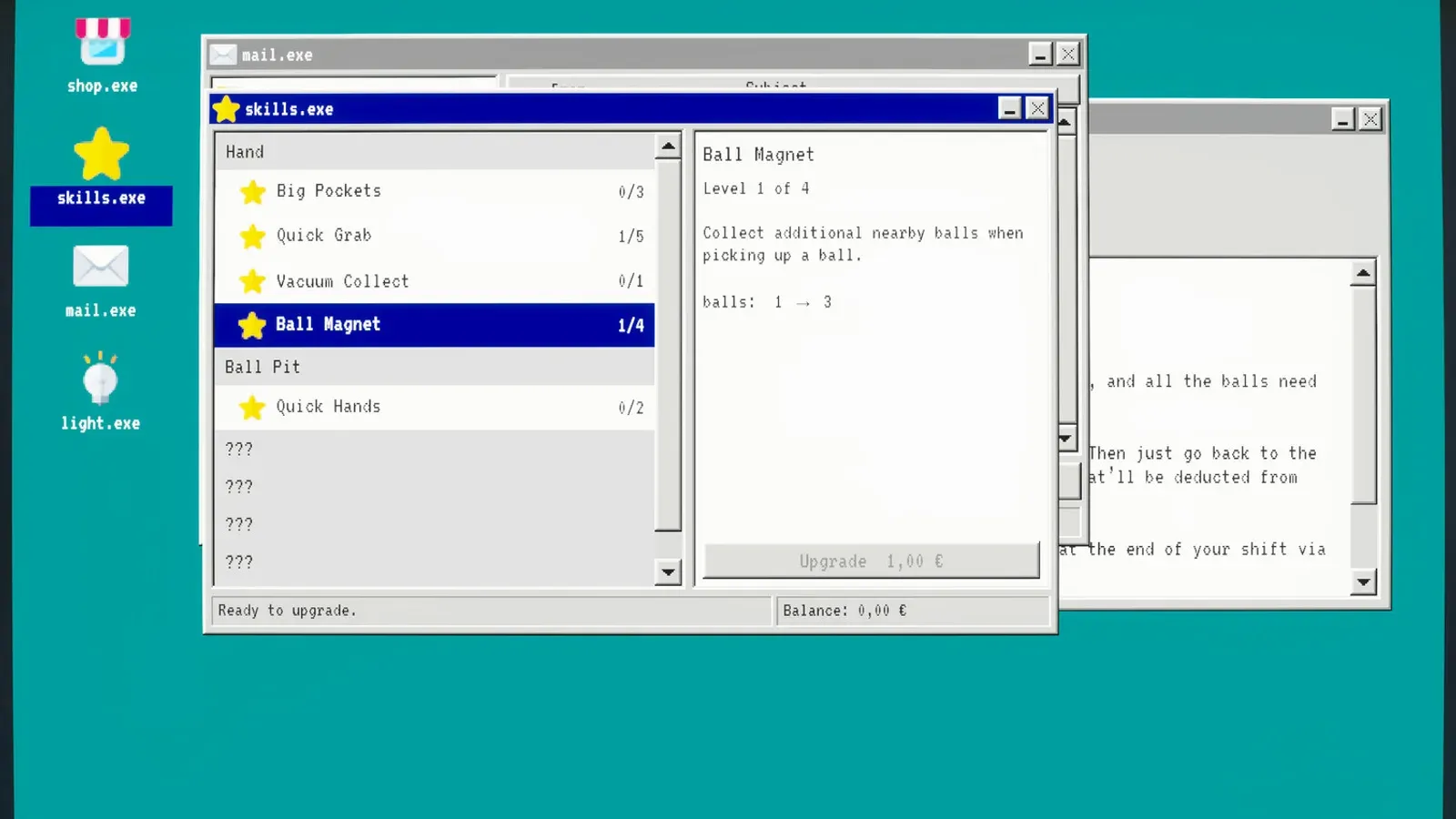
The office is the hub. You spawn at a desk with an in-game computer, and the desktop is where the run is managed. The official screenshot of that desktop shows four icons: shop.exe, skills.exe, mail.exe and light.exe. The green office page→ covers the room itself; the short version is that the computer is the only place where money turns into progress.
Two of those windows matter more than the rest. skills.exe holds the permanent upgrades. shop.exe holds the tools and the keys. Mail is where the job talks to you. The fourth icon is a bulb, which tells you most of what light.exe does.
The room itself
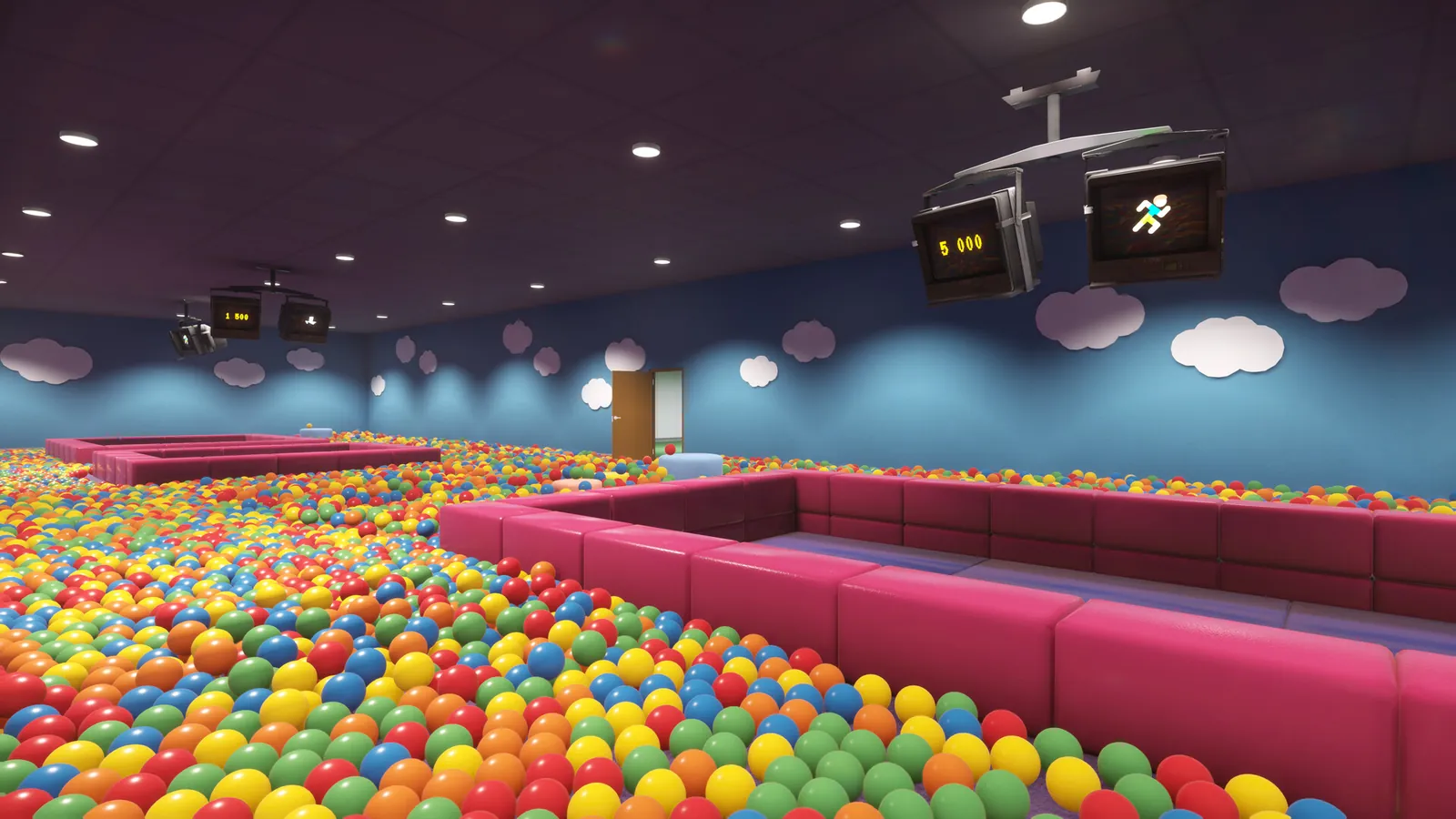
Rooms are self-contained jobs. You arrive through a door and the pit is somewhere inside: a sunken rectangle in the floor, a tiled pool, a hole behind a fence. Balls are scattered in patterns that punish a straight-line sweep. They collect in corners, along walls, under chairs and desks, on top of lockers and railings, and in the water of the Poolroom.
The first area hands you a pit that is easy to fill. The Poolroom is three slides, a shallow pool and about 30,000 balls against a 10,000 pit. The School, the Office and the Hotel each push the ratio further, and the Hotel rearranges its own layout, which is why the whiteboard upgrade exists.
The carry limit is the real difficulty
Combat difficulty does not exist here, and the fear setting only changes the horror layer. What limits you is capacity: how many balls fit in your hands, in the scoop and in the vacuum. Every trip is a walk to the pit and a walk back, so a bigger load removes minutes from a room without changing a single ball.
This is why the upgrade order→ puts capacity above everything except the key. It is also why the robot vacuum is a trap for new players: it automates collection in a room where collection was never the bottleneck.
The skills panel, explained
skills.exe splits into two categories on the official screenshot: Hand and Ball Pit. Five skills are named and ranked; the rest of the list is locked behind question marks until you progress.
| Skill | Category | Max rank on screen | What it changes |
|---|---|---|---|
| Big Pockets | Hand | 0/3 | Carry capacity, the stat that removes trips |
| Quick Grab | Hand | 1/5 | How fast a pickup resolves |
| Vacuum Collect | Hand | 0/1 | A single-rank unlock tied to vacuum collection |
| Ball Magnet | Hand | 1/4 | Collects nearby balls when you pick one up |
| Quick Hands | Ball Pit | 0/2 | Sits under Ball Pit, not Hand |
| Locked entries | Both | 4+ rows of ??? |
Not visible until unlocked |
Selecting Ball Magnet prints the exact effect the game will apply next: "Collect additional nearby balls when picking up a ball", with balls: 1 → 3 underneath and an Upgrade 1,00 € button. At that point in the screenshot the balance reads 0,00 €, so the button is greyed out. That is the pattern for the whole panel: each rank has a price, and the price is quoted in euros while the money in the world is a pile of plastic balls.
The tree is small: fifteen visible ranks across five skills, so you will finish it rather than agonise over which branch to take. Ranks are gated by pit progress rather than by a character level, so a slow first room delays the tree.
Where the money goes
Each key opens the next area and costs more than the one before it, which fixes the room order.
| Purchase | Price | When it matters |
|---|---|---|
| Key to the Waiting Room | 10.00 | After the first pit fills |
| Key to the Backrooms | 25.00 | Second area |
| Key to the Poolroom | 50.00 | Third area, three slides |
| Key to the School | 60.00 | Fourth area |
| Key to the Office | 90.00 | Fifth area |
| Key to the Hotel | 100.00 | Last area, shifting layout |
| Ball vacuum tiers | 20.00 / 25.00 / 34.50 | After the scoop stops being enough |
| Handheld vacuum | 50.00 | The big quality-of-life buy |
| Robot vacuum charger | 10.00 / 15.00 / 22.50 | Per unit; the full set costs more |
The key prices come from the community 100% guide and match the achievement unlock rates, which fall in the same order: 93.86% of players finish the first area, 66.36% reach the last. Tools and the handheld vacuum are priced in the ball vacuum guide→.
Total ball volume across the eight pits is 229,000 capacity, and the store description says the building holds over 200,000 balls. The community guide counts 272,000 scattered, more than the pits hold at once, so a finished run ends up converting most of them into upgrade money.
The end of the shift
A day has a fixed length. When it runs out, the lights go out one by one, and the store's own warning is the instruction: stay in the light. You walk back to the office or a safe room, and what happens if you are still outside depends on the mode.
| Mode | When the dark catches you | What it costs |
|---|---|---|
| Cozy | Nothing. The day ends and you are brought home | No penalty |
| Normal | The day restarts | The shift's progress on that day |
| Hardcore | The save is deleted | The run |
Cozy keeps the entire loop: same pits, same prices, same achievements, minus the threat. The Cozy mode page→ quotes the mode screen verbatim, and the lights out guide→ covers what the darkness does on the two harder settings.
What the gameplay is not
There is no combat, no weapon and no enemy you can fight. The store tags it Single-player, so there is no co-op either. The only clock is the shift, and the seven fixed areas do not reroll their layouts; the Hotel is the exception, and the reason players keep a whiteboard.
The horror is the frame; the cleaning is the game. If that sounds like your kind of thing, the walkthrough→ is the fastest route through all eight pits.
About Playrooms (2026)
Playrooms is a single-player casual simulation game with horror elements, developed and published by Two Pixels UG. It released on November 4, 2026 for Windows PC through Steam at $6.99, with full controller support, Steam Cloud and 30 achievements. The store front talks about over 200,000 balls; community counts put it at eight pits and 272,000 scattered balls.
Official source: Playrooms on Steam ↗ Official source: official patch feed ↗ and global achievement stats ↗
FAQ
How long is one shift in Playrooms? The studio has not published a shift length in minutes, and the HUD does not give you a countdown to plan around, so the light level is your clock. The how long to beat page→ covers the full run instead of a single day.
Do you lose money if you dump balls in the wrong pit? Deliveries are counted per ball and nothing takes money back, so the pit you choose does not change the payout. Leaving balls on the floor is the way you lose value.
Can you skip the cleaning and just buy upgrades? No. Money comes from deliveries, deliveries need balls, and balls need a room. The only shortcut is a bigger carry capacity, which is itself bought with deliveries.
Is the skill tree missable? No. Every rank stays available and nothing in the tree expires. You can finish the run and still buy the cheap ranks afterwards if you want the completion.
Does the fear setting change the money? No. Prices, payouts and pit capacities are identical across Cozy, Normal and Hardcore. Only the consequence of being outside at lights out changes.