
Best Playrooms for Kids (2026): Rooms, Settings and Safety
Which Playrooms areas suit children, how to set fear, audio and controls for a younger player, and the honest limits of a horror-tinged ball-pit game.
Quick answer: If you are looking for a real-world soft-play centre, this page is about a video game and will not help, though our Hong Kong playroom guide→ covers that. If you mean the game Playrooms (Two Pixels UG, $6.99, PC), the child-friendly way to play is: fear setting at its lowest, Extra Audio Settings on with the startle-prone sliders down, the Playroom and Waiting Room first, and a grown-up nearby for the Backrooms and Hotel. The game has no gore, no combat and no online chat, but it is built around being alone in a building at night, and that mood is the part that unsettles younger players.
Two different searches, one honest answer
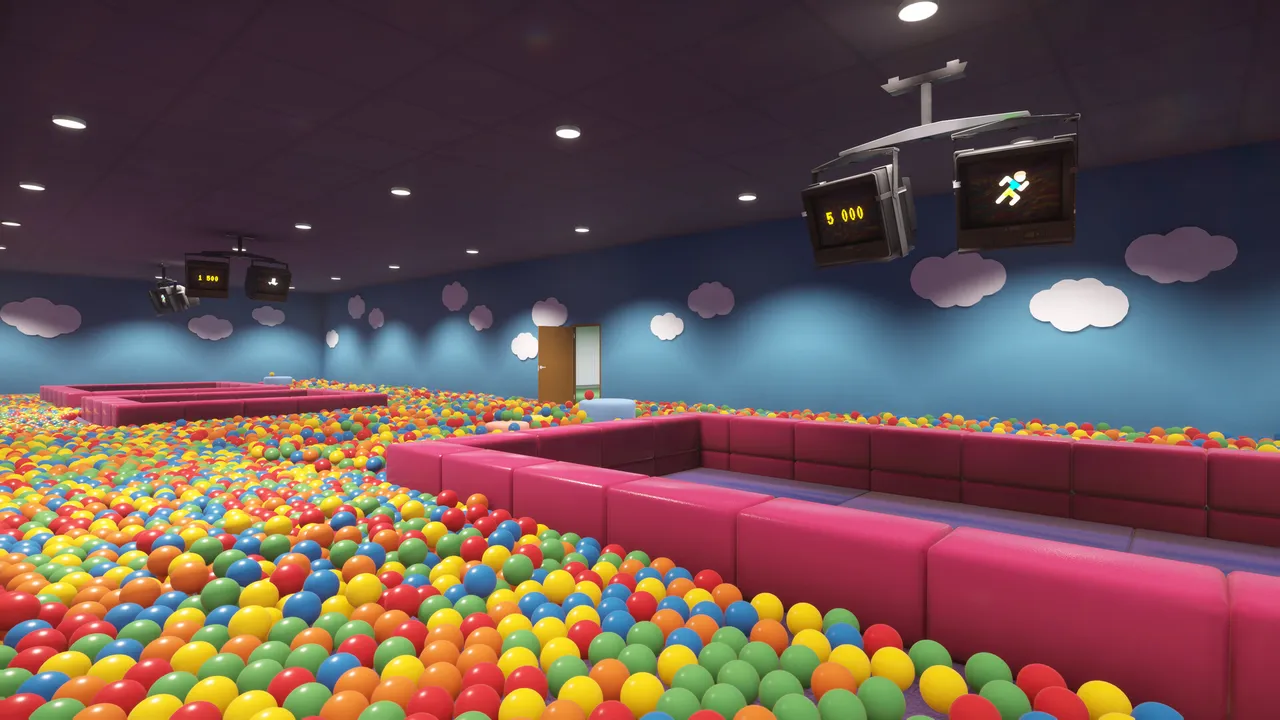
"Best playrooms for kids" mostly means padded indoor play centres: ball pits, slides, birthday parties, a cafe for the adults. Playrooms is not that. It is a first-person cleaning game set in an empty play centre after hours, with horror elements and a liminal-space art style.
This page keeps both meanings visible instead of pretending they are the same thing. For physical venues, use the Hong Kong playroom guide→; it covers locations, age ranges and facilities. For the game, the rest of this page ranks the eight areas by how well they suit a child and lists the settings that make the difference.
The rooms ranked for younger players
The game has eight areas, entered in a chain of doors. They are not equally suitable: the first three are bright and readable, the last four lean on darkness and disorientation.
| Rank | Area | Why it works for kids | Watch for |
|---|---|---|---|
| 1 | Playroom | Bright, pink, one obvious pit, teaches the loop in minutes | Nothing serious; it is the tutorial |
| 2 | Waiting Room | Small pit, chairs, reception desk, short loop | Blind corners where a figure can appear |
| 3 | Poolroom | Slides, water, the most toy-like space in the game | Split levels and balls under the pool lip |
| 4 | School gym | Big open floor, clear sightlines, satisfying volume of balls | Long walk back to the pit |
| 5 | Office | Green carpet, desk, phone, no maze | The phone event is the tensest non-scary beat |
| 6 | Hotel | Strong visual identity, room numbers help | Corridors narrow and the layout shifts |
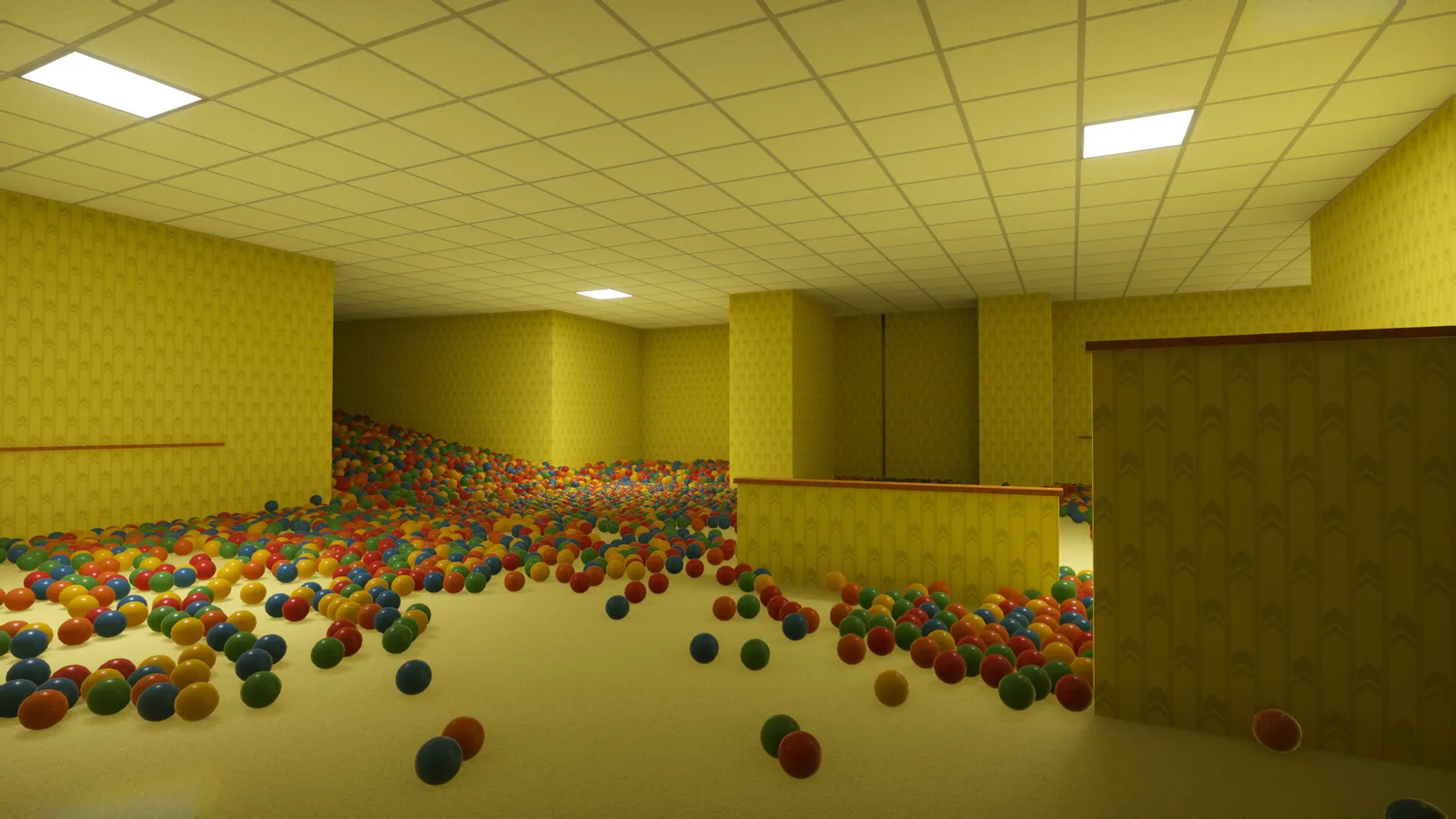
| 7 | Backrooms | The famous yellow maze; older kids recognise it | Easiest place to get lost in a blackout |
| 8 | Final pit | The payoff, and the exit | The run ends here; do not save it for a tired child |
A practical session plan: Playroom and Waiting Room on the first sitting, Poolroom and School on the second, and let the child decide whether to continue into the Hotel. The Backrooms is the one area worth previewing yourself first, because the maze plus a blackout is the combination that produces genuine distress rather than fun.
The settings that matter
Playrooms ships with more accessibility options than its price suggests, and three of them do the heavy lifting for a younger player.
Fear
The store page frames the choice as: "No fear at all, the way it's meant to be, or no second chances? You decide how dangerous your job gets." The lowest setting reduces or removes the scares and the darkest sequences. Achievements still unlock, so nothing is lost by choosing it. The cozy mode guide→ goes through what changes in each room.
Audio
Extra Audio Settings is off by default. Switching it on splits the mix into four sliders: Animals, Mouth & Breathing, Footsteps and Water. For a child who is fine with the game but jumps at a sudden breath or a footstep behind them, turning those two down keeps the cleaning loop intact while removing the cheapest scares.
Controls and comfort
The store lists full controller support, Camera Comfort and Playable without Timed Input. In practice: a controller is easier for small hands than mouse and keyboard, Camera Comfort reduces the head-bob that causes motion sickness, and nothing in the game is a reaction-time test. There is no fail state from being slow.
The clearest signal is the child's own reaction to the Playroom. If the empty building and the fluorescent hum are already too much, no setting will fix it. If they are happily hunting the last ball, the rest is manageable.
What the game does not contain
This is the part parents usually ask about, so it is worth being specific:
- No gore and no combat. There is nothing to fight and no damage system. The tension is navigational and psychological.
- No online play and no chat. The store lists Single-player only. There is no lobby, no voice chat and no way for a stranger to contact a player.
- No microtransactions. It is a $6.99 Early Access game with no in-game store; the price page→ tracks sales.
- No timed input. Nothing punishes slow reading or slow hands.
What it does contain is atmosphere: empty corridors, failing lights, occasional figures at the edge of the beam, and a workplace framing where you are alone on a shift. That is the honest reason to hold it back from a sensitive seven-year-old and hand it to a ten-year-old who likes scary stories.
Is it scary for kids?
Mildly, and inconsistently. The first hour is closer to a toy than a horror game: bright pits, cheerful colours, a shop and a key. The fear arrives later, through blackouts and figures rather than through violence.
The is it scary page→ compares it with other horror games; the short version is that Playrooms is gentler than a typical horror title but not a cozy game. If your child asks to stop after a blackout, stop: the areas stay unlocked and the save keeps progress, so returning later costs nothing.
Choosing between Playrooms and a real play centre
| Need | Playrooms (game) | Real soft-play centre |
|---|---|---|
| Physical activity | None | Climbing, sliding, running |
| Cost | $6.99 once | Entry fee per child, often per session |
| Supervision | A grown-up nearby is still wise | Staff and posted rules |
| Weather | Irrelevant | Depends on the venue |
| Age fit | Roughly 8+ if sensitive, 6+ if not | Usually toddler to around 10 |
| Content risk | Horror atmosphere, no gore | Injury risk, illness, crowd noise |
Neither replaces the other. The game is a rainy-afternoon option that costs less than one entry ticket; a real play centre is the thing the game is pretending to be.
A 30-minute setup checklist
- Install, launch, and open the settings before starting a save.
- Set fear to the lowest option.
- Turn Extra Audio Settings on; lower Mouth & Breathing and Footsteps.
- Enable Camera Comfort if head-bob is a problem.
- Plug in a controller if one is available.
- Sit nearby for the first room, then decide about the Hotel.
That is the whole setup. The game does not hide a difficulty spike behind the menu, and the room order guide→ tells you what comes next if you want to plan the session.
About Playrooms (2026)
Playrooms is a single-player casual simulation game with horror elements from Two Pixels UG. It released for Windows PC on November 4, 2026 at $6.99, is in Early Access, supports controllers, and includes 30 achievements across eight ball-pit areas. The store showed 1,744 reviews at Overwhelmingly Positive on November 19, 2026.
Cross-check version-sensitive details against the Steam listing ↗, the patch notes ↗ and the community hub ↗.
Official source: Playrooms on Steam ↗
FAQ
Is Playrooms suitable for kids? For most children around 8 and up, with the fear setting at its lowest and a grown-up nearby. It has no gore, no combat and no online chat, but it is set in an empty building at night and uses darkness for tension.
What is the best room for a child in Playrooms? The Playroom. It is bright, small, has one obvious pit and teaches the whole loop without a maze.
Can you turn off the scary parts? You can reduce them. The lowest fear setting removes or softens the scares and the darkest sequences, and achievements still unlock.
Does Playrooms have multiplayer or chat? No. It is single-player only.
How long is a session? A room takes roughly 15–30 minutes at a child's pace. The full game is a few hours; there is no need to finish it in one sitting.
Is there a demo? The price and demo page→ tracks the current store options; the listing changes during Early Access.